How to Use Instagram Direct Message Templates
Create and use DM templates to streamline your Instagram communication and outreach.

Ethan Campbell
Updated 16 Oct 2026

Responding to hundreds of Instagram DMs manually wastes hours while creating inconsistent messaging. Instagram business messaging demands both speed and personalization – yet most creators and businesses struggle with repetitive responses that lack the personal touch customers expect.
Meet INSSIST's Instagram Message Templates
INSSIST speeds up Instagram direct messaging by letting creators and businesses save and reuse DM templates, called Replies. By utilizing / slash shortcuts in DM chats and the {@name} variable, social media managers deliver consistent messaging that feels genuinely personal to every recipient.
Replies are free and work without an INSSIST account.
Manual DMs vs INSSIST Templates
| Feature | Manual Responses | INSSIST DM Templates |
|---|---|---|
| Response Time | Up to a minute per DM | 2-10 seconds with shortcuts |
| Personalization | Inconsistent | Automatic first name insertion |
| Message Quality | Varies by typing speed | Professional, consistent |
| Template Management | Copy-paste chaos | Organized, searchable library |
| File Sending | Images only | Extended support (PDF, DOC, CSV) |
INSSIST's Instagram customer service templates maintain professionalism while delivering the speed businesses need for effective communication.
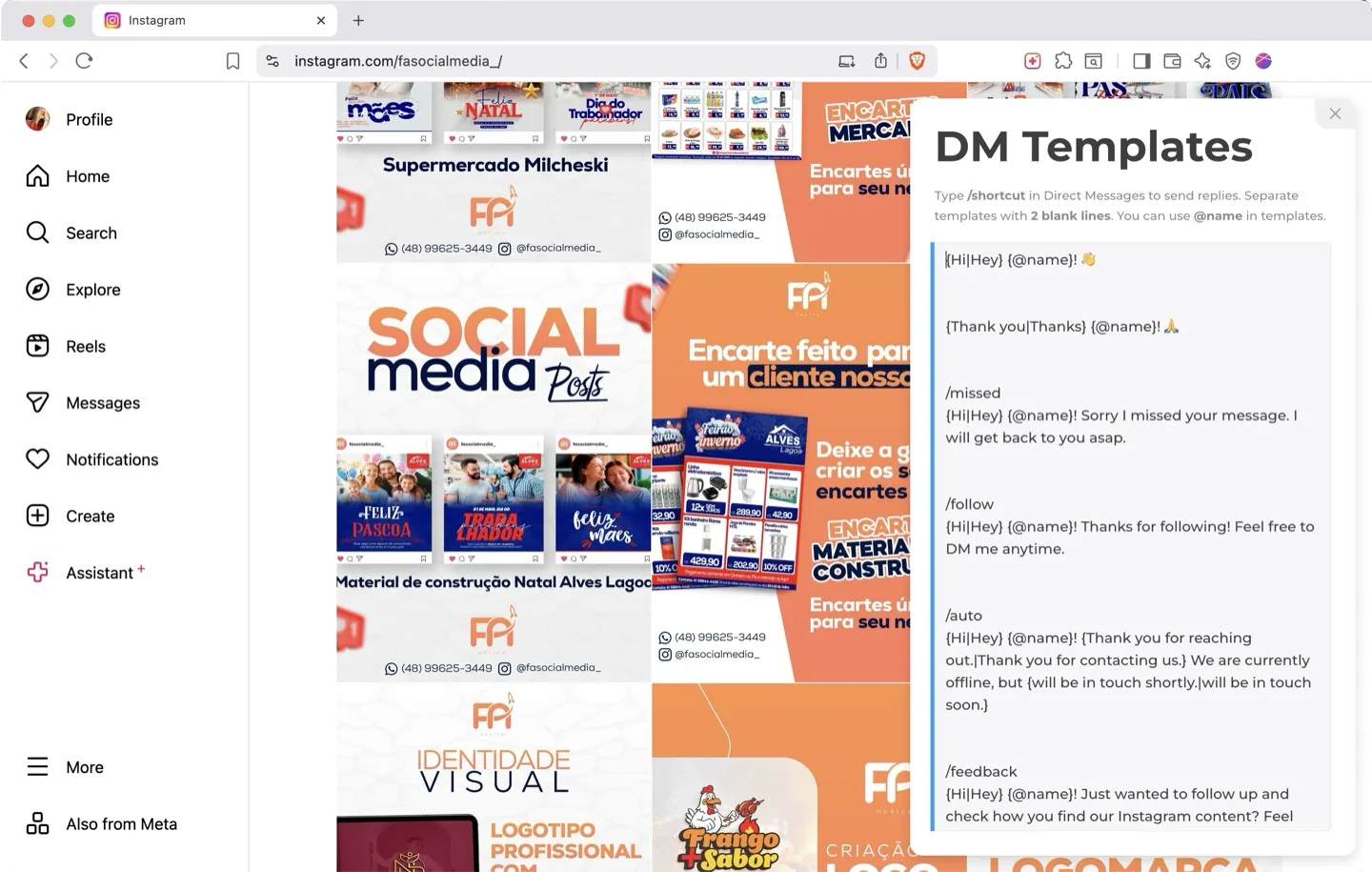
How to Use Instagram DM Templates with INSSIST
Step 1: Install and Open Replies
- Install INSSIST from the Chrome Web Store
- Navigate to Instagram.com and open the INSSIST menu
- Click DM Manager and open the Replies tab
You can also get there from a DM chat: type / in the message field and click MANAGE REPLIES at the bottom of the replies list.
Step 2: Create Custom Templates
Template Creation:
- Click New reply. Each reply is its own card
- Add a Shortcut such as
followfor quick access (optional) - Write your Message using natural language
- Add
{@name}for the recipient's first name, or click First name under the message - Use
{Hi|Hey|Hello}to send one of the words at random, or click Variation - Check the live preview, then click Add reply
- Drag cards to reorder your replies
Example Templates:
- /follow:
{Hi|Hey} {@name}! Thanks for following! Feel free to DM me anytime. - /feedback:
{Hi|Hey} {@name}! Just wanted to follow up and check how you find our content?
Step 3: Use Slash Shortcuts for Instant Messaging
Quick Template Insertion:
- In a conversation on Instagram's Messages page, type
/followed by your shortcut - Select from the filtered list using arrow keys, or click a reply
- Press Enter or Tab to insert it with automatic personalization
- Send immediately or customize further
Smart Personalization:
INSSIST reads the recipient's name from the conversation header and replaces {@name} with their first name, or their username when the profile has no name. @username inserts their Instagram handle.
Advanced Instagram DM Features
Enhanced File Sharing
Beyond templates, INSSIST extends Instagram's file sending capabilities to support PDF, DOC, DOCX, CSV, SVG, and JSON formats – perfect for sharing business documents, contracts, or detailed information.
Ghost Mode for DM
INSSIST also includes Ghost Mode for reading DMs anonymously without marking them as seen, allowing you to prepare thoughtful template responses without triggering read receipts.
FAQ: Instagram DM Templates
How to create Instagram DM templates?
DM templates are available on the Instagram Web platform via INSSIST plugin. Open the INSSIST menu, click DM Manager and go to the Replies tab, or type / in an Instagram DM chat and click MANAGE REPLIES. Click New reply, add a shortcut for quick access, and write your message using {@name} for personalization and {Option1|Option2} for variations.
Can I personalize Instagram message templates?
Yes, INSSIST allows personalizing templates using {@name} and @username variables. {@name} becomes the recipient's first name, taken from the conversation header, ensuring every message feels personal. You can also use {Hi|Hey|Hello} syntax for randomized greetings.
What are the best DM templates for business?
Effective Instagram outreach templates include: welcome messages for new followers (/follow), missed message responses (/missed), auto-replies for offline periods (/auto), and feedback requests (/feedback). Focus on being helpful rather than salesy, and always include personalization variables.
Who needs Instagram DM templates?
Perfect for Instagram business messaging including:
- Customer service teams handling support inquiries
- Content creators thanking followers and sponsors
- E-commerce businesses providing order updates and support
- Coaches and consultants streamlining client communication
- Anyone managing high-volume Instagram conversations
Conclusion
INSSIST's Instagram DM shortcuts transform time-consuming manual responses into efficient, personalized communication.
By combining shortcuts, smart personalization, and comprehensive template management, it enables businesses to maintain authentic connections while dramatically improving response efficiency.
Whether you're handling customer service, building relationships, or managing outreach campaigns, INSSIST Instagram message templates provide the perfect balance of speed and personalization for professional Instagram communication.
Latest posts
INSSIST & Instagram Insights
Learn Instagram marketing strategies and discover INSSIST features

Hanna Laas
10 Sep 2025

Ethan Campbell
1 Sep 2025

Ethan Campbell
9 Sep 2025

Hanna Laas
1 Aug 2025

Hanna Laas
1 Jul 2025

Ethan Campbell
12 Apr 2026

Supercharge your Instagram
Join over 500,000+ creators growing with INSSIST.