How to Create Instagram Posts with AI: 2026 Workflow
A step-by-step 2026 workflow to create Instagram posts with AI: captions, images, carousels, sizes, the AI label, and scheduling.
Ethan Campbell
Published 13 Oct 2026
Table of contents
- What does creating Instagram posts with AI look like in 2026?
- Which AI tools generate images for an Instagram feed?
- Step 1: Plan ideas and write captions with ChatGPT or Claude
- Step 2: Create the image, from scratch or from your photo
- Step 3: Size the image for the Instagram feed
- How to create and schedule an AI post in INSSIST
- How do I use AI to create Instagram images automatically?
- Will Instagram label or limit AI-generated posts?
- How to keep AI posts from sounding generic
- FAQ
To create Instagram posts with AI, use a chat assistant such as ChatGPT or Claude to plan ideas and draft captions, an image model to create or edit the visual, then size it to 4:5 and schedule it. AI does the first draft in minutes. The posts that perform keep a human hook, one real detail, and your own photos wherever you have them.
What does creating Instagram posts with AI look like in 2026?
Creating Instagram posts with AI in 2026 is a six-step pipeline, and AI helps with four of the steps. The guides that rank for this topic, from Smash Balloon to Metricool, agree on the order:
- Plan: a chat assistant turns your content pillars into a month of post ideas.
- Write: the same assistant drafts captions and carousel slide copy in your voice.
- Create the image: generate one from a prompt, or edit your own photo with AI.
- Size it: 4:5 portrait for the feed, 9:16 for Stories and Reels.
- Edit as a human: rewrite the hook, check every fact, cut the generic lines.
- Schedule and review: publish at your best times, then feed what worked back into the next prompt.
Step 5 is the one most people skip, and it is the one audiences notice. In 2026, AI-generated content that reads as generic gets called "AI slop" in comments, and creators report lower engagement on fully AI posts than on mixed ones (SocialXpresso).
Which AI tools generate images for an Instagram feed?
AI image tools for an Instagram feed split by job: generating from text, editing your photo, or laying out text and graphics. No single tool wins every job.
| Tool | Best for | Note |
|---|---|---|
| ChatGPT image generation | Generating a scene from a text prompt, quick variations | Adds C2PA metadata |
| Meta AI in Instagram | Generating and restyling images inside Instagram itself | Labels its output as AI |
| Canva Magic Studio | Carousels, text overlays, brand colours and fonts | Best place to add text |
| Midjourney | Stylised, artistic visuals | Weak at text inside images |
| Ideogram | Images that must contain a short word or phrase | Better text rendering than most |
| INSSIST AI photo editing | Editing your own photo, then posting it from the same tab | Photos only, runs in Chrome |
Meta AI added image generation and Story restyle effects powered by its Muse Image model in July 2026 (9to5Mac). If you want Meta AI to stop using your public posts as references, there is an opt-out under the Sharing and reuse settings (USA Today).
Step 1: Plan ideas and write captions with ChatGPT or Claude
ChatGPT and Claude write usable Instagram captions when you give them context: who you post for, what you sell, and how you sound. A bare "write an engaging Instagram caption" prompt returns the average of the internet.
Set the context once. In Claude, put it in a Project; in ChatGPT, in a custom GPT or project instructions. Include 5-10 of your best past captions, your audience in one sentence, and 3-5 content pillars.
Then plan a month in one prompt:
We are a small neighbourhood bakery. Audience: locals aged 25-45
who care where their food comes from. Pillars: behind the scenes,
new bakes, regulars' stories, weekend offers.
Give me 20 Instagram post ideas for November. For each: the hook,
the format (single photo, carousel or Reel) and the call to action.
Draft each caption from one idea:
Write an Instagram caption for idea #4. Match the voice of the
example captions above. Open with the hook, keep it under 80 words,
end with one question for the comments, then 3-5 specific hashtags.
Give me 3 versions.
For carousels, ask for slide-by-slide copy: a hook on slide 1, one point per slide with 20-30 words at most, and the call to action on the last slide (CreatorFlow). Instagram allows up to 2,200 characters per caption and 30 hashtags; our Instagram hashtag guide covers how to pick them.
Step 2: Create the image, from scratch or from your photo
You can create an Instagram image with AI in two ways: generate it from a text prompt, or edit a photo you took. Generating is right for illustrations, concept shots and backgrounds. Editing your own photo is right for anything your followers expect to be real: your product, your space, your face.
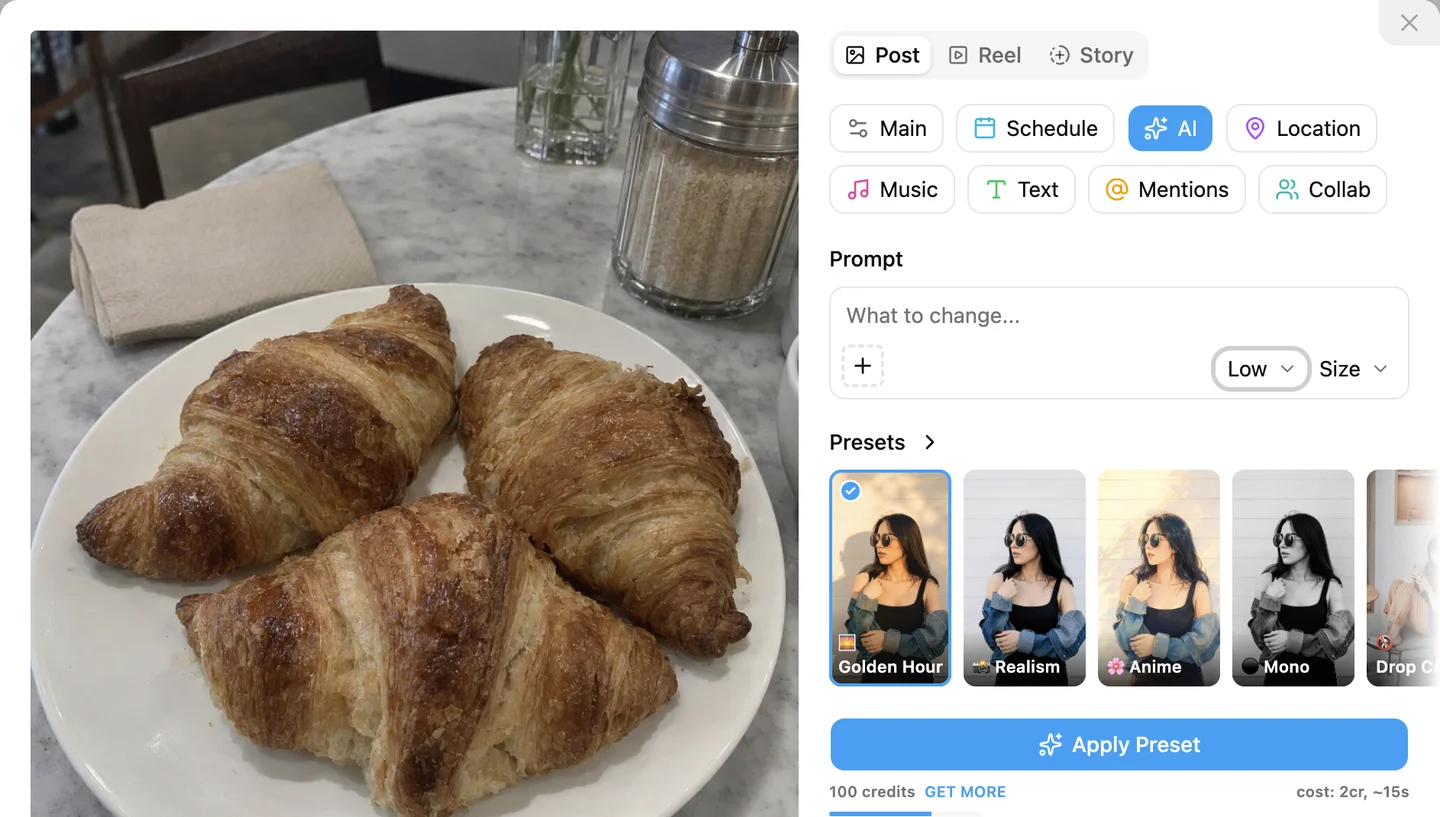
Editing keeps the post authentic. The croissants below are a plain phone snapshot under flat café light; one sentence of prompt turned it into a warm morning shot with a cappuccino added, and the pastries themselves stayed the same.
When you generate from scratch, write the prompt like a photo brief: subject, setting, light, camera angle, mood, and the aspect ratio you need. Ask for 4 variations and keep the best one.
Leave text out of the image. Image models draw letters as shapes, so words on signs, labels and quote cards come out misspelled or garbled (GoodEye). Generate the picture without text, then add the words in Canva or another editor. If the text must be part of the image, keep it to 1-3 words, put the exact phrase in quotes in the prompt, and use a tool known for text such as Ideogram.
Step 3: Size the image for the Instagram feed
Size AI images for Instagram at 4:5 portrait, 1080 x 1350 pixels, for feed posts and carousels. It takes up the most room in the feed and every scheduler accepts it. Use 9:16, 1080 x 1920, for Stories and Reels (Virallized, Outfeed).
The profile grid previews posts as 3:4 tiles, so keep key objects in the centre. Use one ratio for every carousel slide, and generate at the final ratio instead of cropping later. All sizes are in our Instagram image size cheat sheet.
How to create and schedule an AI post in INSSIST
INSSIST is a Chrome extension for Instagram that lets you edit a photo with AI, write the caption, crop and schedule the post in one panel on instagram.com. Here is the full flow:
- Open instagram.com in Chrome, click the INSSIST menu and choose Create & schedule.
- Click ADD FILES and pick your photo, or several for a carousel.
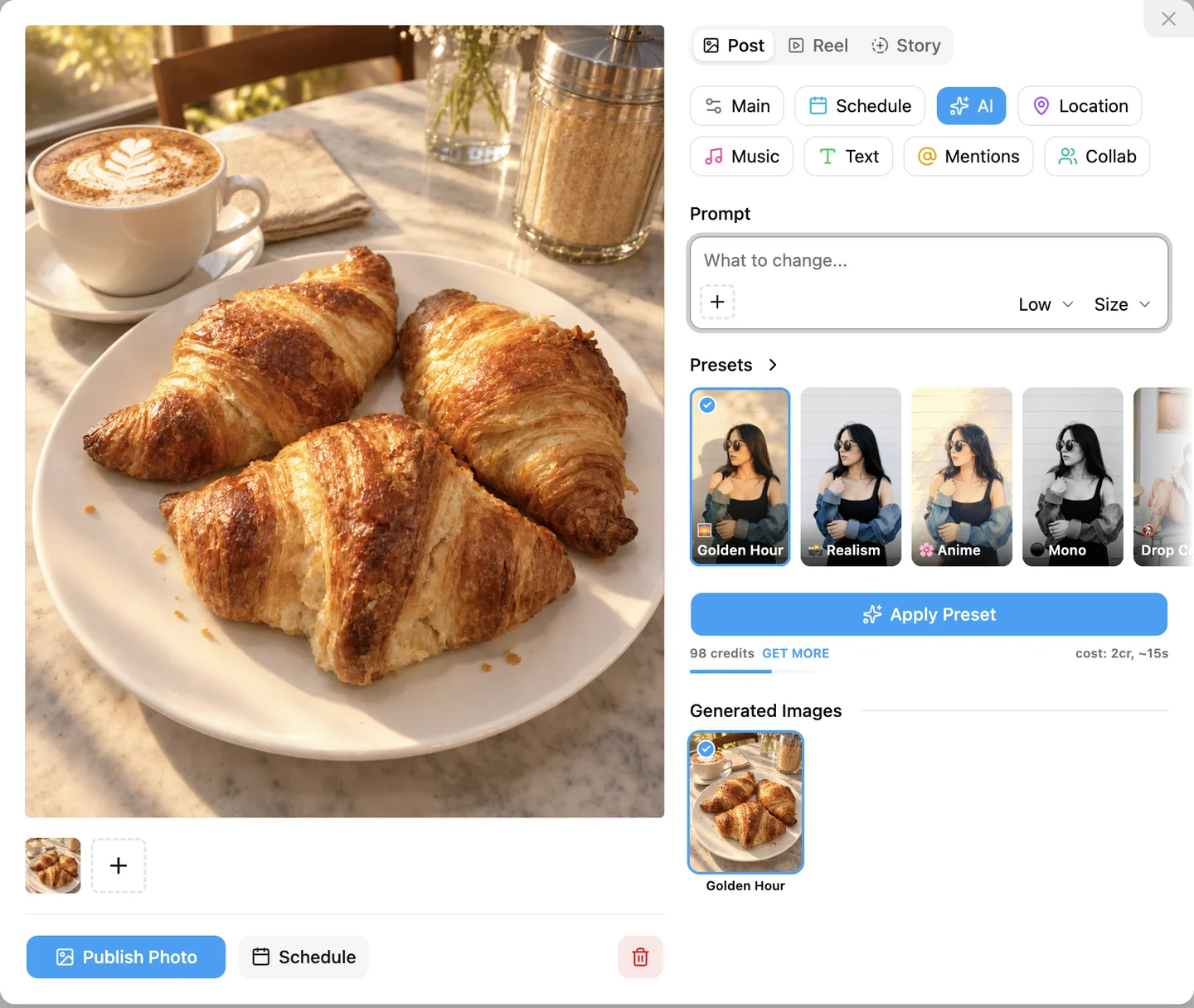
- Open the AI tab. Pick a preset such as Golden Hour, or type what to change in the Prompt box ("What to change...").
- Choose the quality and size, then click Edit Image (Apply Preset when you only picked a preset). Low quality takes about 15 seconds, Medium about 40, High about 100.
- The result replaces the photo in the post and is saved under Generated Images. Click another result to switch; the original stays one click away.
- Go to the Main tab. Set Aspect Ratio to Portrait · 4:5 and paste your caption.
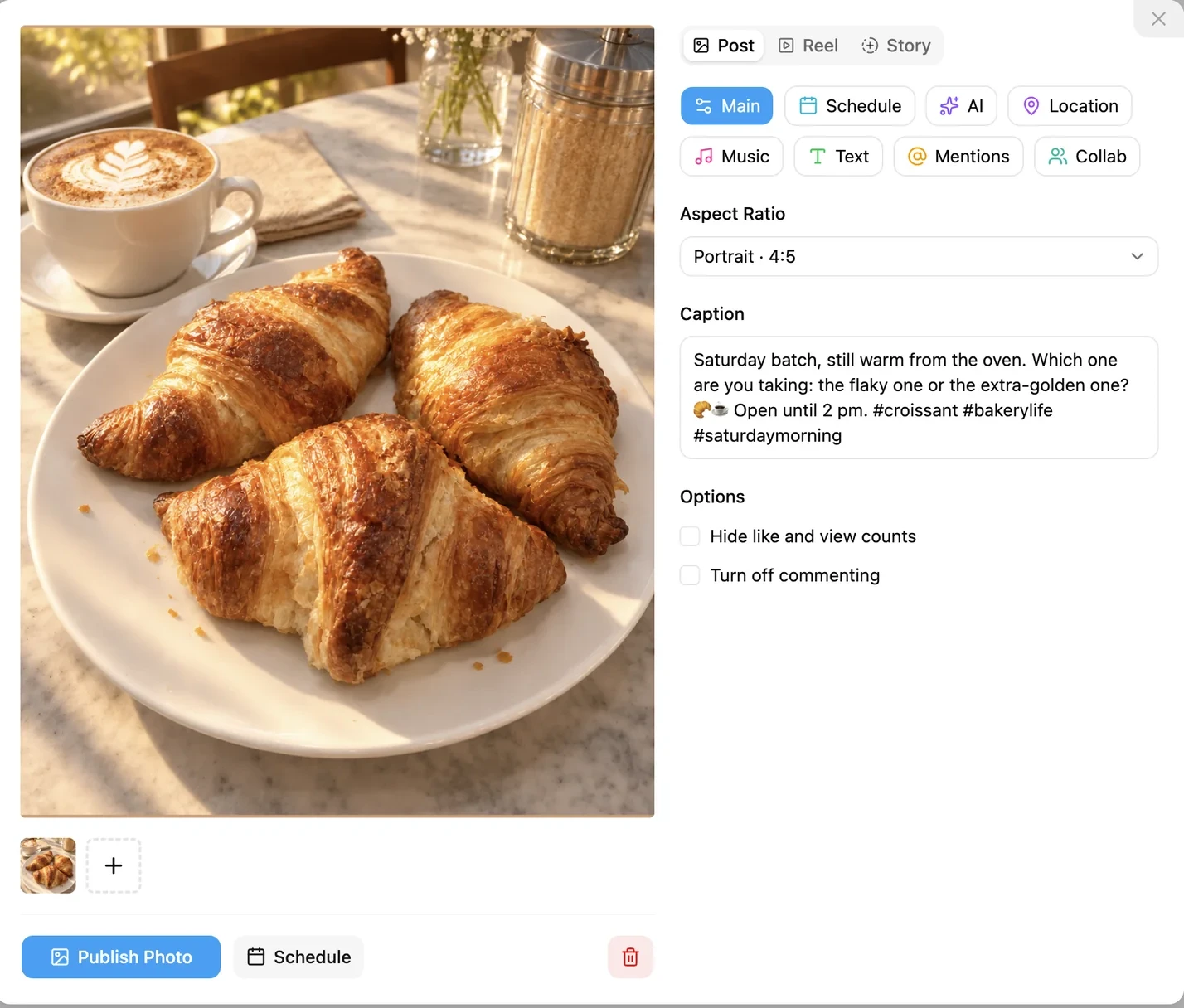
- Add a location, tag people or invite collaborators from the tabs above if you need them.
- Open the Schedule tab, pick the date and time, and click Schedule. Or click Publish Photo to post now.
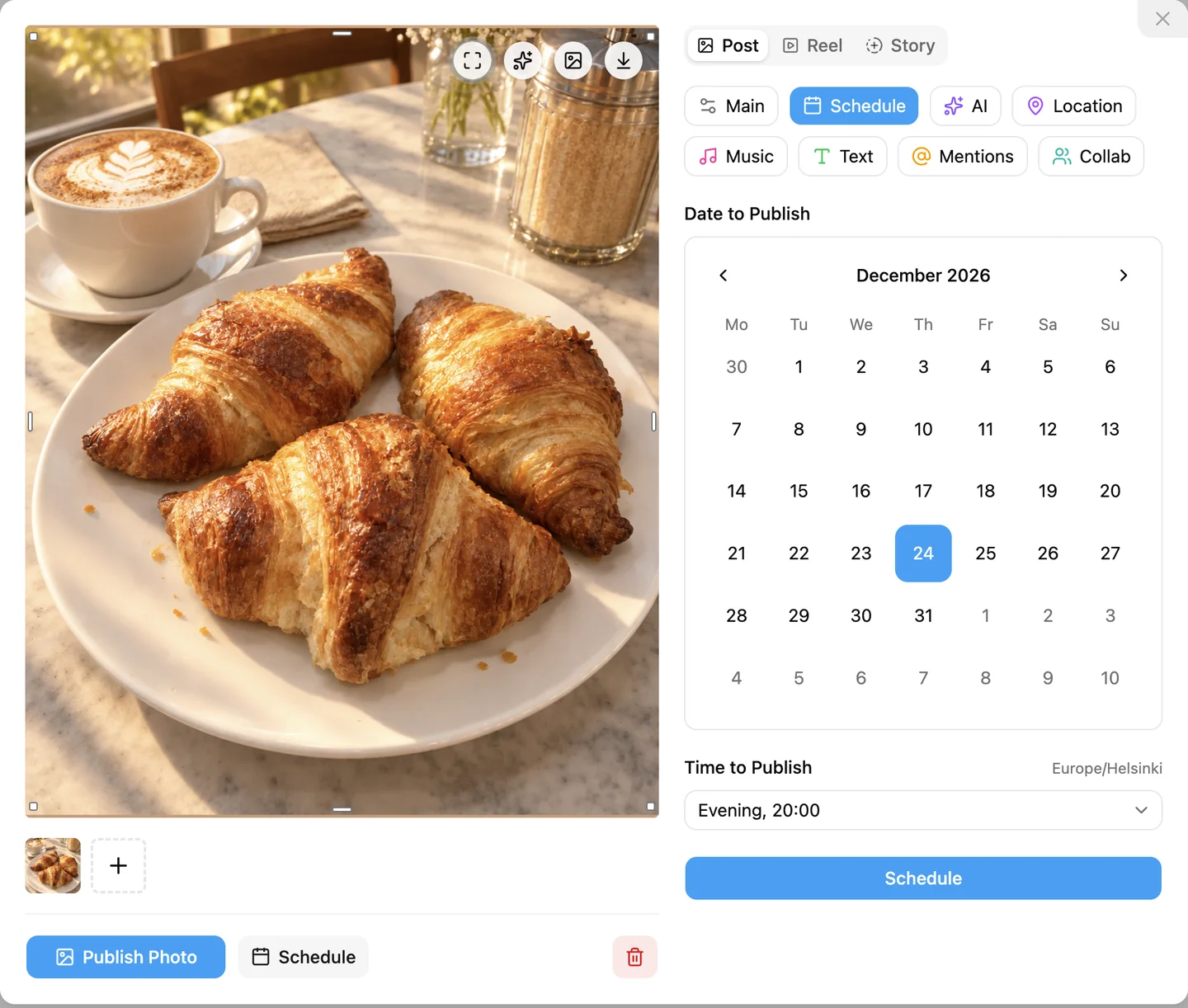
INSSIST AI editing works on photos in posts, carousels and Stories; it does not edit video. You can also mask part of the photo, add up to 3 reference images, and pick from 28 presets. The INSSIST AI photo editor guide covers presets, masks, credits and pricing in detail. INSSIST does not use your photos for training and does not store them on its servers.
Publishing a photo post now is free in INSSIST. Scheduling is part of INSSIST PRO; see how to schedule Instagram posts for the calendar, slots and bulk tools.
How do I use AI to create Instagram images automatically?
You can automate most of the busywork of making Instagram posts with AI, but not the judgement. A realistic setup in 2026 has three parts:
- Batch the writing. One planning prompt for the month, one caption prompt per idea, edited in one sitting.
- Batch the images. Create the week's visuals in one session at 4:5 and save them to one folder.
- Let an AI agent do the posting. With the INSSIST MCP server, Claude Code, Codex or Cursor turn your image files and captions into drafts and schedule them in your INSSIST calendar, where you review them.
Keep a human in two places: the final caption edit, and the reply to every early comment. An automated feed where no one answers comments reads as a bot to the people who follow it.
Will Instagram label or limit AI-generated posts?
Instagram may show an "AI info" label on posts with AI-generated images, and the label alone does not appear to cut reach for ordinary posts in 2026 (Kompozy). Meta renamed the label from "Made with AI" in July 2024 after real photos with light edits were being flagged (Sume).
Instagram applies the label in two cases: you mark the post as AI yourself when uploading, or the file carries industry metadata such as C2PA Content Credentials. ChatGPT, Adobe Firefly and other major tools embed that metadata by default (PrivyClean). Detection is mostly metadata-based, so it misses some AI images and occasionally flags real ones (The Verge).
The stricter rule is about accounts, not posts. Since 31 August 2026, profiles that feature AI-generated people without the "AI-generated profile" label lose recommendations to non-followers in Reels and Explore; labelled profiles keep their reach (TechCrunch). If you post a fully AI persona, label it.
How to keep AI posts from sounding generic
AI posts sound generic when the prompt is generic and nobody edits the output. Four habits fix most of it:
- Feed it your voice. Paste real past captions as examples, and tell it the words you never use.
- Add one real detail per post. A price, a name, a time, something that happened today. AI cannot invent your Tuesday.
- Use the "cover the handle" test. Hide your username and read the caption. If it could belong to any account in your niche, rewrite the first line (Lilach Bullock).
- Prefer your photos. An AI-edited photo of your real product reads as yours; a generated stock scene reads as everyone's.
FAQ
Can AI create a whole Instagram post for me?
Yes, AI can draft every part of an Instagram post: the idea, caption, hashtags and image. You still review it, because AI invents facts and defaults to a generic voice.
What is the best AI image generator for Instagram?
It depends on the job. ChatGPT and Meta AI generate scenes from a prompt, Canva handles carousels and text overlays, Ideogram renders words, and INSSIST AI editing improves photos you already took.
Does Instagram penalize AI-generated content?
Instagram does not appear to penalise ordinary posts for being AI-generated in 2026; it labels them with "AI info" instead. The reach limit that exists targets accounts posting AI-generated people without the "AI-generated profile" label, a rule in force since 31 August 2026.
Can I remove the "AI info" label from my post?
The honest route is to keep the label when the image is AI-generated: it does not appear to reduce reach, and it builds trust with your audience. If a real photo was labelled after a light edit, you can check what triggered it by tapping the label on the post.
What size should AI images be for Instagram?
Feed posts and carousels: 4:5 portrait, 1080 x 1350 pixels. Stories and Reels: 9:16, 1080 x 1920.
Can ChatGPT or Claude post to Instagram directly?
ChatGPT and Claude cannot post to Instagram on their own, but an AI agent such as Claude Code, Codex or Cursor can, through the INSSIST MCP server. Setup takes one command; see the INSSIST MCP server guide.
Latest posts
INSSIST & Instagram Insights
Learn Instagram marketing strategies and discover INSSIST features
Hanna Laas
10 Sep 2025
Ethan Campbell
1 Sep 2025
Ethan Campbell
9 Sep 2025
Hanna Laas
1 Aug 2025
Hanna Laas
1 Jul 2025
Ethan Campbell
12 Apr 2026
Supercharge your Instagram
Join over 500,000+ creators growing with INSSIST.