INSSIST vs Buffer vs Later: Best Instagram Scheduler 2026
INSSIST vs Buffer vs Later in 2026: prices for one Instagram account, which posts truly auto-publish, and which scheduler fits a small business.

Hanna Laas
Published 14 Oct 2026

Table of contents
- Which Instagram scheduler is best for a small business in 2026?
- Can you schedule Instagram posts for free?
- INSSIST vs Buffer vs Later at a glance
- How much does each scheduler cost for one Instagram account?
- Which Instagram posts auto-publish, and which send a phone reminder?
- Chrome extension vs standalone app: how does each scheduler publish?
- Which scheduler has the best planning tools?
- How to schedule an Instagram post with INSSIST
- FAQ
Buffer is the cheapest way to schedule a professional Instagram account alongside other networks, Later is built around a visual planner for brands that post across several platforms, and INSSIST publishes from your own Chrome, so personal accounts, Story link stickers and music go out without a phone reminder. For a small business the right scheduler depends on how many networks you post to and how much of your Instagram is Stories.
Which Instagram scheduler is best for a small business in 2026?
The best Instagram scheduling tool for a small business owner in 2026 is the one that matches where you post and what you post. Prices and features below were checked on each tool's own pricing and help pages in October 2026.
- Meta Business Suite: pick it if you have a professional Instagram account linked to a Facebook Page and want to pay nothing.
- Buffer: pick it if you post the same content to Instagram, Facebook, LinkedIn and other networks on a small budget.
- Later: pick it if you plan a polished feed across Instagram, TikTok and Facebook and want a drag-and-drop visual calendar.
- INSSIST: pick it if Instagram is your main channel, you work from a computer, and you post Stories with links, mentions or music, or run a personal account.
The rest of this guide shows the facts behind each pick: cost for one account, which formats really auto-publish, and how each tool reaches Instagram.
Can you schedule Instagram posts for free?
Yes. Meta Business Suite schedules Instagram posts, Reels and Stories for free, on desktop or in its mobile app, and can publish the same Story to Instagram and Facebook at once (Meta Business Help Center). It needs a professional (business or creator) Instagram account connected to a Facebook Page.
Buffer's Free plan covers 3 channels with up to 10 scheduled posts per channel at a time, so it suits a light posting rhythm (Buffer pricing). Later has no free plan in 2026, only a 14-day trial (Later pricing).
INSSIST's free version posts photos, videos, carousels, Reels and Stories from your computer right away; scheduling for later is part of INSSIST PRO. Meta also launched a paid tier in September 2026: the Meta One Advanced plan for creators, from $49.99 a month, lists scheduling Stories up to 30 days ahead (Meta newsroom).
INSSIST vs Buffer vs Later at a glance
INSSIST, Buffer and Later all schedule Instagram feed posts, carousels and Reels on a calendar. They differ in price model, account types and how much of Instagram's Story toolkit they can publish without you finishing the post on your phone.
| Feature | Buffer | Later | INSSIST |
|---|---|---|---|
| Free plan | 3 × 10 posts | Trial only | Post now |
| Paid from | $5 / channel | $18.75 / mo | $14.50 / mo |
| Networks | Many | Many | |
| Personal accounts | Reminder | Not supported | ✓ |
| Auto-publish Stories | Business, creator | Business | All accounts |
| Story link sticker | Reminder | Reminder | ✓ |
| Music on Stories and posts | Reminder | Reminder | ✓ |
| Carousel items | 10 | 10 | 20 |
| Grid preview | Professional | Visual Planner | ✓ |
| Publishes from | Buffer's servers | Later's servers | Your Chrome |
"Reminder" means the tool sends a push notification at the scheduled time and you finish the post in the Instagram app. Sources for each row are in the sections below.
How much does each scheduler cost for one Instagram account?
For one Instagram account, Buffer Essentials is the cheapest paid plan at $5 a month, INSSIST Pro costs $14.50 a month, and Later Starter costs $18.75 a month billed yearly. The price models differ, so the gap changes as you add accounts or networks.
| Plan | What you get | Price |
|---|---|---|
| Buffer Free | 3 channels, 10 scheduled posts per channel | $0 |
| Buffer Essentials | Unlimited scheduled posts, advanced analytics | $5 per channel per month |
| Buffer Team | Essentials plus unlimited users and approvals | $10 per channel per month |
| Later Starter | 1 social set (up to 8 profiles), 30 posts per profile per month, 1 user | $18.75 per month, yearly |
| Later Growth | 2 social sets, 180 posts per profile per month, 2 users | $37.50 per month, yearly |
| INSSIST Pro | Scheduling, calendar, bulk editing, insights, AI tools, MCP for AI agents | $14.50 per month |
| INSSIST Lifetime | All publishing, scheduling and content management features | $145 once |
Prices are as listed on Buffer, Later and the INSSIST pricing table in October 2026. Buffer bills per channel, so one Instagram account plus a Facebook Page counts as two. Later bills per social set, which covers one profile per network, and caps Starter at 30 posts per profile each month: a business posting a feed post and a Story every day hits that cap in about two weeks.
INSSIST PRO is bought per Instagram account, with 20% off each extra account on the Pro plan. The Lifetime plan is a one-time payment instead of a subscription.
Which Instagram posts auto-publish, and which send a phone reminder?
API-based schedulers auto-publish simple posts but fall back to a phone reminder for personal accounts and for Stories with interactive elements. Instagram's Content Publishing API only accepts professional accounts and limits carousels to 10 items (Meta for Developers), and every API tool inherits those rules.
What Buffer and Later document in 2026:
- Buffer auto-publishes single images, carousels, videos, Reels and Stories on business and creator accounts. Personal accounts, music on posts or Stories, links on Stories, text on Stories and product tags switch to notification publishing (Buffer Help Center).
- Later auto-publishes Stories only for business profiles; creator profiles use notification publishing. Stickers, polls, music, links and effects need notification publishing, and Instagram personal profiles can no longer be connected (Later Help Center).
INSSIST publishes the post itself, the same way instagram.com does, so the account type does not matter. A scheduled INSSIST Story can carry a link sticker, a location, mentions and music, and a carousel can hold up to 20 photos and videos, matching the limit Instagram's own app has offered since August 2024 (PetaPixel). Posts and Reels can also tag collaborators, add a custom cover, hide likes or turn off comments.
Chrome extension vs standalone app: how does each scheduler publish?
A standalone scheduler such as Buffer or Later uploads your media to its own servers and publishes through Meta's official API at the scheduled time, so your computer can be off. A Chrome extension scheduler such as INSSIST publishes from your browser through the Instagram session you are already logged into, so your computer needs to be on and online at post time.
| Scheduler type | How it publishes | What that means |
|---|---|---|
| Standalone app | Meta's Content Publishing API from the tool's servers | Runs while your laptop is closed; API rules apply |
| Chrome extension | Your logged-in instagram.com session in Chrome | Full Instagram toolkit; Chrome must be running |
INSSIST shows "Publishing requires your computer to be online" under the schedule picker. If Chrome is offline at the scheduled time, INSSIST retries as soon as the computer is back online; you can also choose to abort a post that has been offline for 1, 3, 12 or 24 hours, which suits time-sensitive Stories.
For a deeper look at what browser extensions add to Instagram, see our guide to the Chrome extension for Instagram.
Which scheduler has the best planning tools?
All three schedulers have a content calendar with drag and drop; the differences are in how you see your feed and how fast you can fill a week.
- Later's Visual Planner lets you drag media or text-only posts onto one calendar across all your networks. Every plan includes Instagram best-time-to-post suggestions and hashtag suggestions (Later pricing).
- Buffer organises posts in a queue and calendar, and its Grid Preview shows scheduled posts next to your published ones for Instagram professional accounts (Buffer Help Center).
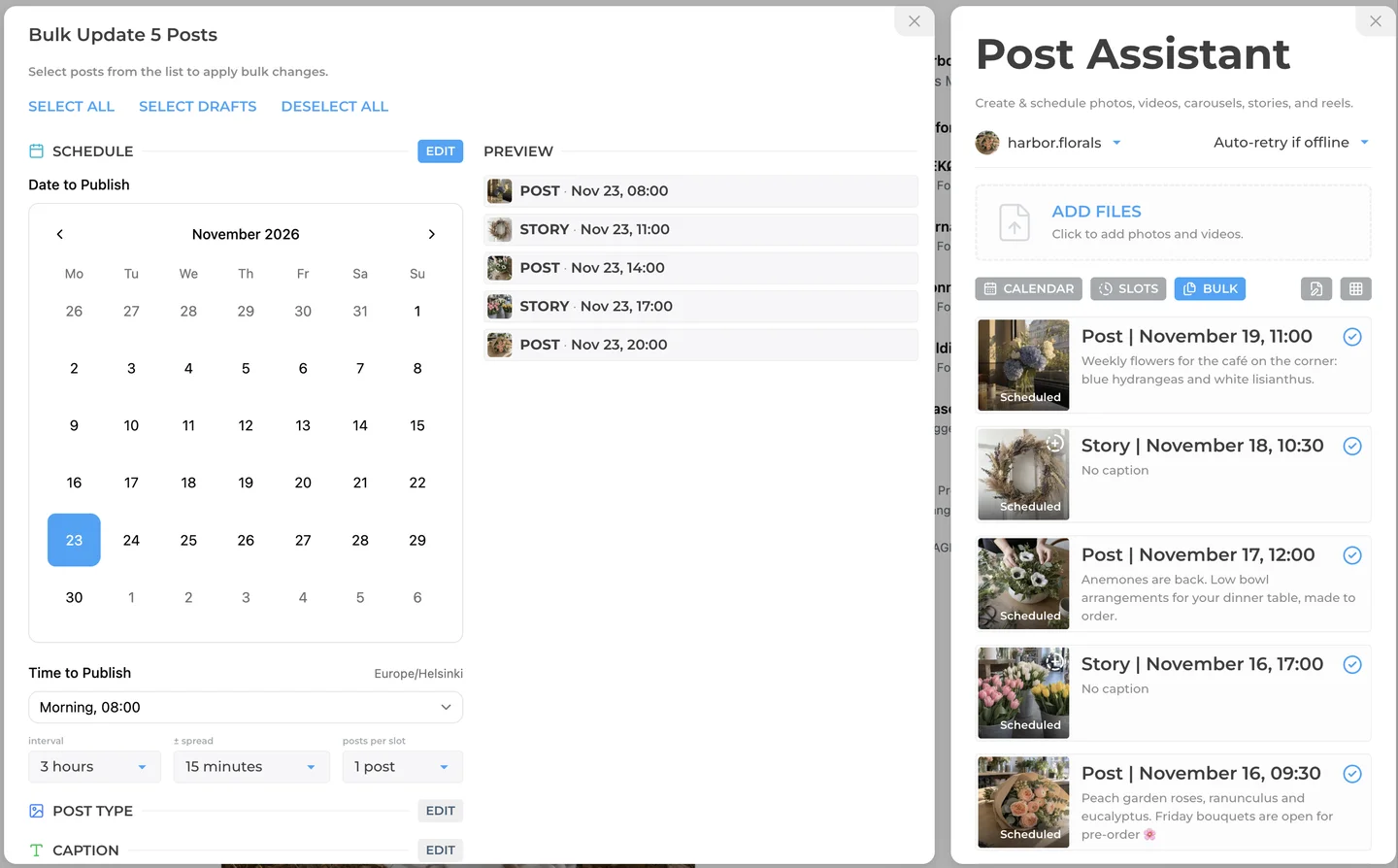
- INSSIST has Month and Week calendar views, a Grid view of upcoming posts, and Slots: preset posting times you can fill with one click. The BULK panel takes a batch of drafts and sets the post type, caption, location, Story link and schedule for all of them at once, with an interval between posts, a random time spread and a number of posts per slot.
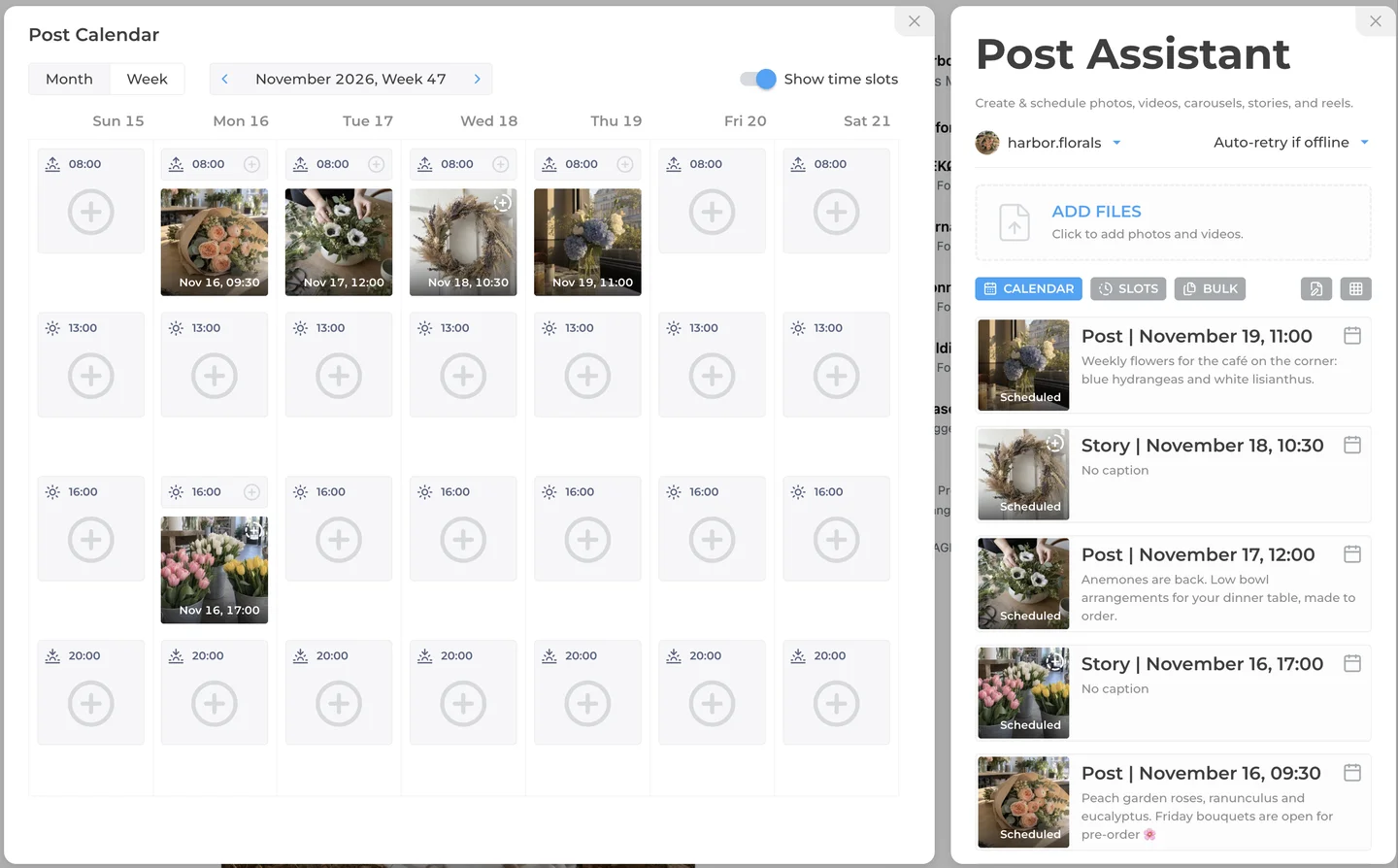
Because INSSIST runs inside instagram.com, the same window also handles DMs, comments, hashtag research and insights, so a small team does not switch between a scheduler and the Instagram app.
How to schedule an Instagram post with INSSIST
INSSIST schedules posts, Reels and Stories from the Post Assistant panel on instagram.com. Here is the flow for a Story with a link sticker:
- Open instagram.com in Chrome, click the INSSIST menu and choose Create & schedule.
- Click ADD FILES and pick your photos or videos. With several files, choose separate posts or one carousel.
- Pick the type at the top of the editor: Post, Reel or Story.
- Add what the post needs on the tabs: caption on Main, a link sticker on Link, a place on Location, a track on Music, accounts on Mentions.
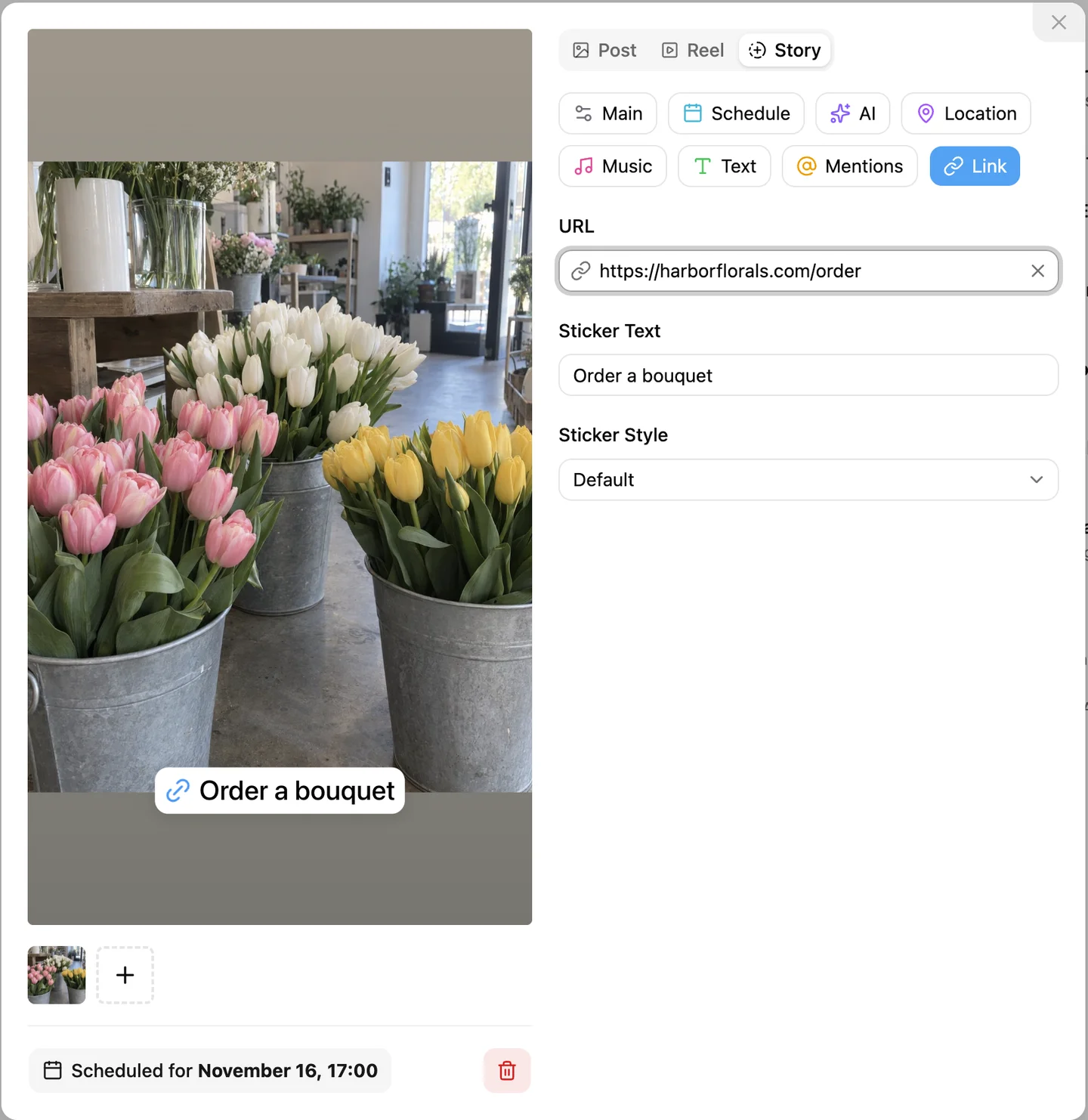
- Open the Schedule tab, pick the date and time, and click Schedule. The post shows "Scheduled for" with the date and moves onto the calendar.
- To fill a week at once, add all files, select the drafts in BULK, and set the start date and interval under SCHEDULE.
The full walkthrough, including Reels covers and multiple accounts, is in our guide on how to schedule Instagram posts and Stories. To post right away instead, see how to post to Instagram from PC, and for Story music read how to add music to Instagram Stories on PC.
FAQ
Is Buffer free for Instagram?
Yes. Buffer's Free plan connects up to 3 channels, Instagram included, with up to 10 scheduled posts per channel at a time. Paid Essentials starts at $5 per channel per month and removes the post limit.
Does Later still have a free plan?
No. As of October 2026 Later offers a 14-day free trial, then paid plans from $18.75 per month billed yearly. The Starter plan allows 30 posts per profile per month.
Can Buffer or Later post Instagram Stories automatically?
Yes, for simple Stories on professional accounts. Buffer auto-publishes Stories on business and creator accounts, and Later on business profiles only. Stories with music, links or stickers switch to a phone notification in both tools, and you finish them in the Instagram app.
Can I schedule posts on a personal Instagram account?
Yes, with a browser-based scheduler. Instagram's API does not accept personal accounts, so Buffer sends reminders instead and Later no longer connects them. INSSIST publishes through your logged-in instagram.com session, so personal, creator and business accounts all auto-publish.
Does INSSIST need my computer on to publish?
Yes. INSSIST publishes from Chrome on your computer, so the computer must be on and online at the scheduled time. If it is offline, INSSIST retries automatically when it reconnects, or aborts the post after a delay you choose.
Which Instagram scheduler is cheapest for one account?
Meta Business Suite is free for professional accounts. Among paid tools, Buffer Essentials costs $5 per month for one channel, INSSIST Pro $14.50 per month, and Later Starter $18.75 per month billed yearly. INSSIST also has a one-time Lifetime plan at $145.
Latest posts
INSSIST & Instagram Insights
Learn Instagram marketing strategies and discover INSSIST features

Hanna Laas
10 Sep 2025


Ethan Campbell
1 Sep 2025

Ethan Campbell
9 Sep 2025

Hanna Laas
1 Aug 2025


Hanna Laas
1 Jul 2025

Ethan Campbell
12 Apr 2026

Supercharge your Instagram
Join over 500,000+ creators growing with INSSIST.